



NativeAOT-friendly minimal cross-platform pseudo-terminal library for .NET.
Motivation
I needed a PTY library for NativeAOT projects, but existing .NET PTY libraries don't reliably work with NativeAOT. MiniPty is a minimal PTY library with a simple API, no third-party dependencies, and in-process backends built for AOT publish.
Benchmarks
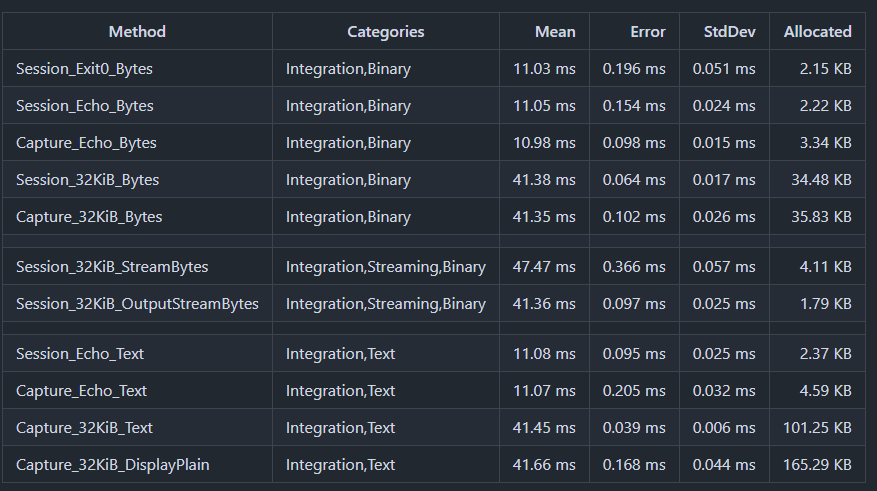
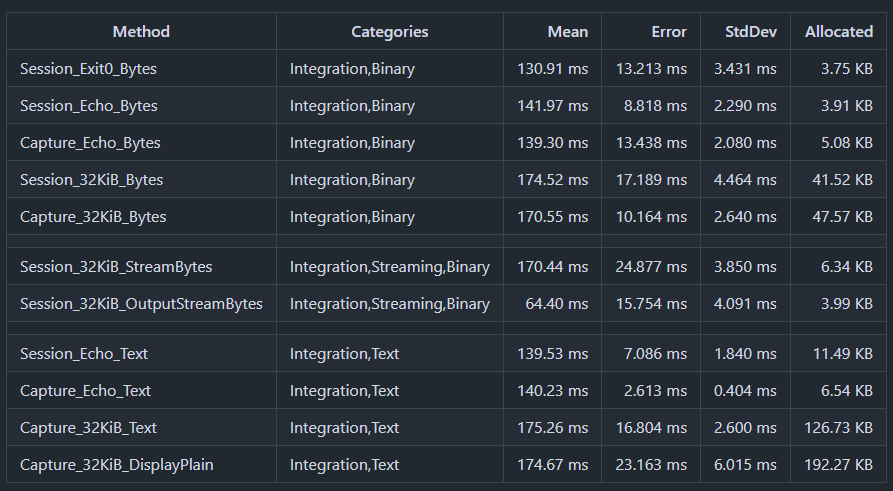
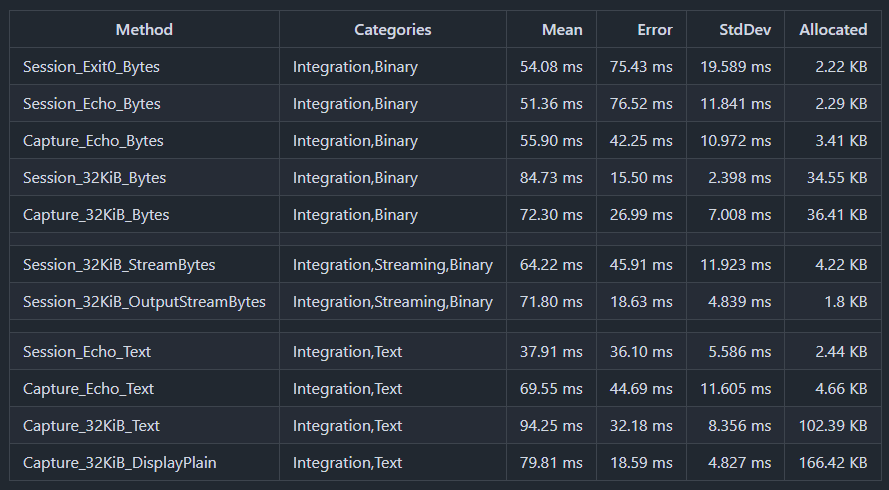
You can check various benchmark patterns at GitHub Actions/Benchmark.
Ubuntu
Windows
macOS

- NativeAOT ready, in-process backends only, no winpty or bundled helpers
- Multi-platform ready, Windows, Linux, macOS, and FreeBSD
- Spawn a child in a pseudo-terminal (
Pty.Start) - Overlay child environment variables and set Unix
TERM Input/Outputbyte streams; stdout and stderr merged onOutput- Persistent bytes-only output streaming (
ReadOutputAsync) - One-shot run with optional stdin and drained output (
CompleteAsync) - Resize the terminal after spawn (
PtySession.Resize) - Run on the out-of-band ConPTY an application supplies on Windows (
PtyStartInfo.ConPty,ConPtyLibrary), withClear()for frontends that clear their scrollback - Exit status with Unix termination signal (
WaitForExitAsync,ExitStatus) and signal kill (Kill(PtySignal)) - Per-read timestamps for observation or recording (MiniPty.Capture,
PtyCapture.RunAsync) - Host terminal input attach for interactive programs (MiniPty.Console,
PtyConsoleInput.Attach) - Backend PTY for xterm.js / editor terminals: push facade, pause/resume flow control, WebSocket bridge (MiniPty.Terminal,
PtyTerminal,PtyWebSocketBridge) - Plain or colored host output from PTY bytes (
PtyOutput.ToDisplayText)
Not supported
- Remote shells (
ssh) or tunneling a PTY over the network - Full terminal emulation, TUI replay, or faithfully preserving
\roverwrite lines - Falling back to pipe redirect when PTY creation fails—if you need a PTY, MiniPty either gives you one or throws
MiniPty creates a real PTY on each supported OS; it does not fall back to redirected pipes when PTY creation fails.
| OS | Backend | Notes |
|---|---|---|
| Windows | ConPTY (CreatePseudoConsole) |
Uses Win32 ConPTY directly through P/Invoke, attaches the child with PROC_THREAD_ATTRIBUTE_PSEUDOCONSOLE, and resizes with ResizePseudoConsole. Requires Windows 10 1809+ / Windows 11. No winpty or helper process is used. An application can supply the out-of-band ConPTY (conpty.dll + OpenConsole.exe) per session with PtyStartInfo.ConPty; see Out-of-band ConPTY. |
| Ubuntu / Linux | forkpty |
Uses the small libminipty_unix native shim to call the platform PTY API, then execve the child inside the PTY. Resize uses TIOCSWINSZ. |
| macOS | posix_spawn + helper |
Uses the Unix backend through libminipty_unix.dylib with a posix_spawn helper process (not forkpty). Resize uses TIOCSWINSZ. |
| FreeBSD | forkpty |
Uses the Unix backend through libutil, matching the Linux/macOS PTY lifecycle. |
Install NuGet packages by running the following commands.
# PTY session management and lifecycle
dotnet add package MiniPty

# Timestamped PTY output observation (per-read chunks)
dotnet add package MiniPty.Capture

# Host terminal input attach for interactive sessions (vim, etc.)
dotnet add package MiniPty.Console

# Backend PTY for xterm.js / editor terminals (push events, flow control, WebSocket bridge)
dotnet add package MiniPty.Terminal
MiniPty start a session with Pty.Start, then choose one pattern:
- Persistent stream:
ReadOutputAsync+WriteInputAsync+WaitForExitAsync - One-shot run:
CompleteAsync
Disposing a session ends the child if it is still running: on Unix it is hung up first (SIGHUP, so a shell can save its history) and killed after a one-second grace period if it has not exited, or at once if the host process exits normally before then. A host ended within that second by a crash or by a signal it does not cancel sends no kill, so a child that ignores the hang-up keeps running. On Windows the child is terminated. If nobody reads output while the child writes, the PTY buffer can fill and the child will block; ReadOutputAsync, CompleteAsync, and continuous Output stream reads avoid that. Try dotnet samples/SingleFiles/README_MiniPty.cs to run this sample.
using System.Diagnostics;
using System.Runtime.InteropServices;
using MiniPty;

Console.Error.WriteLine("=== 1) Stream mode: chunks arrive over time ===");
await RunStreamModeAsync();

Console.Error.WriteLine();
Console.Error.WriteLine("=== 2) One-shot mode: one completion result ===");
await RunCompleteModeAsync();

static async Task RunStreamModeAsync()
{
    await using var session = Pty.Start(CreateTimedOutputStartInfo());
    var sw = Stopwatch.StartNew();
    var chunks = 0;
    await foreach (var chunk in session.ReadOutputAsync())
        Console.WriteLine($"+{sw.Elapsed.TotalSeconds,4:F1}s chunk#{++chunks} ({chunk.Data.Length} bytes)");

    Console.WriteLine($"stream exit={(await session.WaitForExitAsync()).ExitCode}, chunks={chunks}");
}

static async Task RunCompleteModeAsync()
{
    await using var session = Pty.Start(CreateTimedOutputStartInfo());
    var result = await session.CompleteAsync();
    Console.WriteLine($"complete exit={result.ExitCode}, bytes={result.Output.Length}");
    Console.WriteLine(PtyOutput.ToDisplayText(result.GetText(), PtyOutputDisplayMode.PlainText).TrimEnd());
}

static PtyStartInfo CreateTimedOutputStartInfo()
{
    if (RuntimeInformation.IsOSPlatform(OSPlatform.Windows))
    {
        return new PtyStartInfo
        {
            FileName = Environment.GetEnvironmentVariable("ComSpec") ?? @"C:\Windows\System32\cmd.exe",
            Arguments = ["/c", "echo alpha & timeout /t 1 /nobreak >nul & echo beta & timeout /t 1 /nobreak >nul & echo gamma"],
            Size = new PtySize(120, 30),
        };
    }

    return new PtyStartInfo
    {
        FileName = "/bin/sh",
        Arguments = ["-c", "printf 'alpha\\n'; sleep 1; printf 'beta\\n'; sleep 1; printf 'gamma\\n'"],
        Size = new PtySize(120, 30),
        TerminalName = "xterm-256color",
        Environment = new Dictionary<string, string?>
        {
            ["NO_COLOR"] = null,
            ["MINIPTY_SAMPLE"] = "true",
        },
    };
}
PtyStartInfo.Environment overlays the parent environment. A null value removes a variable; an empty string sets an empty variable on platforms that preserve empty environment values. A FileName without a directory is found on the child's PATH on every platform: on Windows, where CreateProcess would search only your process's PATH, MiniPty searches the child's whenever the overlay sets or removes PATH, appending .exe as CreateProcess does and skipping empty and relative entries, which would point at your process's current directory. That PATH therefore chooses the program on every platform: build it only from sources you trust, or give FileName as a full path. Only .exe is appended, never an extension from PATHEXT, so write a batch shim with its extension: FileName = "npm.cmd", not "npm". A FileName ending in .cmd or .bat always runs through the escaped cmd.exe path described below. On Unix, TerminalName sets TERM; if no TERM remains, MiniPty defaults it to xterm-256color. On Windows, TerminalName is currently ignored and TERM is only passed when explicitly set in Environment.
On Windows, ConPTY clears the frontend's screen when the child starts. Set PtyStartInfo.InheritCursor = true to continue below what the frontend already shows, such as an editor's banner or, with MiniPty.Console, the host terminal's prompt (attach before starting the output pump, as ConsoleAttach.cs does). The frontend must then answer ConPTY's cursor position query, as terminal emulators do on their own; until it does, the child waits. Unix ignores the option because its PTY never clears the screen.
On Windows, ending a session ends the child and the processes attached to its console, but a program the child started in a console of its own keeps running, and if the host crashes, everything the child started does. Set PtyStartInfo.KillProcessTree = true to run the child in a kill-on-close job: Dispose, Kill, and the end of the host process, including a crash, then end the whole tree. Unix ignores the option; there disposal hangs the child up, which ends the descendants in the terminal's foreground process group.
| Session | KillProcessTree |
Why |
|---|---|---|
| A command run for its result: a CI step, a test runner, an agent's tool call, an untrusted script | true |
Nothing it started is wanted afterwards, and leftovers must not survive a crashed host. |
| An interactive terminal: an editor's terminal panel, a terminal app's tab | false (default) |
A window the user opened from the shell (code ., start notepad) should survive closing the tab, as it does in Windows Terminal and VS Code. |
using MiniPty;

// A build step run for its result. Whatever it starts, even in a console of its own, ends with the session:
// at disposal, after a timeout too, and if this process crashes.
await using var session = Pty.Start(new PtyStartInfo
{
    FileName = Environment.GetEnvironmentVariable("ComSpec") ?? @"C:\Windows\System32\cmd.exe",
    Arguments = ["/c", "npm test"],
    KillProcessTree = true,
});
var result = await session.CompleteAsync(new PtyCompleteOptions { ExitTimeout = TimeSpan.FromMinutes(10) });
Console.WriteLine($"exit={result.ExitCode}");
The option also ends programs the user started on purpose, which is why it is off by default. No process can leave the job, so a program that asks to (CREATE_BREAKAWAY_FROM_JOB, as some installers and updaters do) fails to start inside such a session.
If you are building a terminal emulator on Windows, use this. Windows ships ConPTY in kernel32.dll, backed by the conhost.exe of the user's Windows build, and that host decides what the frontend gets to see: current builds consume mouse tracking modes, DECCKM, terminal queries, and graphics protocols instead of forwarding them, so a program's request for mouse events never reaches your emulator, and the behavior changes with Windows updates. Microsoft publishes the implementation Windows Terminal carries as the NuGet package Microsoft.Windows.Console.ConPTY (conpty.dll plus OpenConsole.exe): it forwards everything, behaves the same on every Windows build, supports Clear(), and ends output the moment the child exits where the in-box path waits for a 100 ms quiet interval (cmd /c echo completes in 33 ms against 141 ms in PtyConPtyBenchmarks). MiniPty ships neither file and depends on nothing; your application references the package and opts in per session:
<PackageReference Include="Microsoft.Windows.Console.ConPTY" Version="1.25.260930003" />using MiniPty;
// Null when conpty.dll is not in the application directory: the session then runs on the in-box ConPTY.
var conpty = ConPtyLibrary.TryLoadFromApplicationDirectory();
if (conpty is { HasConsoleHost: false })
Console.Error.WriteLine($"{conpty.Path} has no OpenConsole.exe beside it and will fall back to conhost.exe");
await using var session = Pty.Start(new PtyStartInfo
{
FileName = Environment.GetEnvironmentVariable("ComSpec") ?? @"C:\Windows\System32\cmd.exe",
ConPty = conpty, // forwards mouse tracking and queries, supports Clear(), ends output as soon as the child exits
});What to know before you ship it:
- Use package 1.25 or later (verified with
1.25.260930003). Any published version loads, but the out-of-band host asks the frontend what terminal it is at startup (ESC[c), and hosts before 1.25 wait three seconds for the answer. A terminal emulator answers on its own; a consumer that only reads output, such asCompleteAsync, never does, and on 1.25+ the host no longer waits for it. - The two files travel with your application. MiniPty's build targets place
OpenConsole.exe(about 1 MB per architecture) besideconpty.dllin the output and publish folders whenever the package is referenced, in both the runtime-specific and the portable layout; the package's own build files do that only for C++ or architecture-specific projects. Updating them, security fixes included, is a package update in your project, not a MiniPty release. - A missing host is silent.
conpty.dllwithoutOpenConsole.exebeside it runs the in-boxconhost.exewithout any error;ConPtyLibrary.HasConsoleHosttells you before the first session, as in the snippet above. - Each session gets an
OpenConsole.exechild process instead ofconhost.exe, which matters to process monitoring and allow lists. - The library is loaded by absolute path only (a bare
conpty.dllcould bind a copy an operating system ships), once per path, andLoadfails if the DLL lacks the exports MiniPty uses. On Unix aConPtyLibrarycannot be loaded andClear()is a no-op. - It is native code running as your application. Give
Loadonly a path you control, never one from configuration, the environment, or a command line, and install the two files where your own binaries are protected: whoever can write that directory runs code as your application, sinceconpty.dllalso launches theOpenConsole.exebeside it. Both files in Microsoft's package are Authenticode-signed by Microsoft; verify the signature beforeLoadif your deployment requires it.TryLoadFromApplicationDirectorylooks nowhere but the application directory, and MiniPty's build targets stage the host only for the DLL that package resolved.
Details and measurements: Out-of-band ConPTY.
MiniPty is not a sandbox. Processes run with the parent process permissions unless the host application isolates them with OS users, containers, or another security boundary.
On Windows, Arguments for a .bat or .cmd file are escaped for cmd.exe, so user input passed to a tool's batch shim reaches the script as data rather than as commands. A script can still run what an argument holds, for example with cmd /c %1 or echo %~1. An argument with a carriage return, a line feed, or a NUL is rejected with ArgumentException, and so is a command line over the 8191 characters cmd.exe runs. A raw CommandLine reaches cmd.exe exactly as you write it, and when you start cmd.exe yourself, whatever follows /c is parsed as a command, so never pass user input there (Batch files).
Two limits of that escaping matter when the shim forwards %* to a program. A quote inside an argument has to be written as "", the only form cmd.exe keeps inside quotes. A program that parses its command line with the UCRT, as .NET, Node.js, and Python do, reads it back as one quote. A program that uses CommandLineToArgvW or the pre-2008 msvcrt.dll rules, as Go and MinGW builds do, reads it as a quote that also ends the quoting, so the argument boundaries after it move: x" --evil y arrives there as x", --evil, and y. If user input can hold a quote and the program behind the shim is one of those, reject the quote yourself before calling Pty.Start. The script is also the file CreateProcess would find for FileName from your process's current directory and PATH (the child's PATH when Environment sets or removes it), and cmd.exe receives its full path, so cmd.exe no longer searches the child's WorkingDirectory for it as it did when CreateProcess started the batch file itself.
GUI hosts (WinUI, WPF, WinForms, Avalonia) can await every MiniPty API on the UI thread. Asynchronous members never block the caller, so await foreach over ReadOutputAsync processes each chunk on the UI thread with no copy and no marshaling (during an output flood, a chunk is handed over through the dispatcher every 8 ms so input and rendering keep running), Resize from size-changed events is safe at any time (including after the child has exited), and DisposeAsync on tab close does not block. Output is read on one dedicated thread per session, never on a thread-pool worker, so idle tabs do not starve the host's pool. On Windows, run every session on the out-of-band ConPTY: reference Microsoft.Windows.Console.ConPTY and set ConPty = ConPtyLibrary.TryLoadFromApplicationDirectory() (Out-of-band ConPTY). The in-box ConPTY consumes mouse tracking modes and terminal queries, so a program's request for mouse events never reaches your emulator. The call returns null on Unix, so the same line works on every platform. See samples/WinUiTerminal (code-only WinUI 3, Windows) and samples/AvaloniaTerminal (Avalonia; Windows, Linux, macOS), two terminal emulators built this way on a shared VT core, and the GUI hosts section of the specification.
MiniPty.Capture one call that runs the child, pumps output, and returns merged text, exit code, and per-read chunks. Each chunk's timestamp is elapsed time since Pty.Start. Try dotnet samples/SingleFiles/README_MiniPty.Capture.cs to run this sample.
using System.Runtime.InteropServices;
using MiniPty;
using MiniPty.Capture;

var result = await PtyCapture.RunAsync(CreateCaptureStartInfo());

// Chunk timestamps are measured from session start (immediately after `Pty.Start`).
foreach (var chunk in result.Chunks)
    Console.WriteLine($"{chunk.Time.TotalSeconds:F3}: {chunk.Data.Length} bytes");

foreach (var textChunk in result.GetTextChunks())
    Console.WriteLine($"{textChunk.Time.TotalSeconds:F3}: {textChunk.Text.Span}");

// Or plain text for logging:
Console.WriteLine(result.ToDisplayText(PtyOutputDisplayMode.PlainText));

static PtyStartInfo CreateCaptureStartInfo()
{
    if (RuntimeInformation.IsOSPlatform(OSPlatform.Windows))
    {
        return new PtyStartInfo
        {
            FileName = Environment.GetEnvironmentVariable("ComSpec") ?? @"C:\Windows\System32\cmd.exe",
            Arguments = ["/c", "echo capture-sample"],
            Size = new PtySize(120, 30),
        };
    }

    return new PtyStartInfo
    {
        FileName = "/bin/sh",
        Arguments = ["-c", "printf '\\e[31mcapture-sample\\e[0m\\n'"],
        Size = new PtySize(120, 30),
    };
}
MiniPty.Console attaches the host terminal to a running session for interactive programs (vim, etc.). It forwards raw keyboard bytes to the PTY and syncs host resize events. It does not read PTY output — the embedder remains the sole output consumer via ReadOutputAsync and writes bytes to host stdout. Try dotnet samples/SingleFiles/README_MiniPty.Console.cs to run this sample.
using System.Runtime.InteropServices;
using MiniPty;
using MiniPty.Console;

if (Console.IsInputRedirected || Console.IsOutputRedirected)
{
    Console.Error.WriteLine("Run this sample from an interactive terminal (TTY).");
    return;
}

await using var session = Pty.Start(CreateShellStartInfo());
Console.Error.WriteLine($"[MiniPty] child pid={session.ProcessId}, size={session.Size.Columns}x{session.Size.Rows}");
Console.Error.WriteLine("[MiniPty] Try: type `echo hello`, resize the window, then `exit`.");

using var attachCts = new CancellationTokenSource();
var outputStats = new OutputStats();
var pumpTask = PumpOutputAsync(session, outputStats);
using var consoleInput = PtyConsoleInput.Attach(session);

var exitTask = session.WaitForExitAsync(attachCts.Token);
_ = exitTask.ContinueWith(
    static (_, state) => ((CancellationTokenSource)state!).Cancel(),
    attachCts,
    CancellationToken.None,
    TaskContinuationOptions.ExecuteSynchronously,
    TaskScheduler.Default);

consoleInput.PumpInputUntil(attachCts.Token);
var exitCode = (await exitTask).ExitCode;
await pumpTask;
ResetHostCursorColumnIfNeeded();
Console.Error.WriteLine($"[MiniPty] shell exit={exitCode}, chunks={outputStats.Chunks}, bytes={outputStats.Bytes}");

static async Task PumpOutputAsync(PtySession session, OutputStats stats)
{
    var stdout = Console.OpenStandardOutput();
    await foreach (var chunk in session.ReadOutputAsync())
    {
        stats.Chunks++;
        stats.Bytes += chunk.Data.Length;
        await stdout.WriteAsync(chunk.Data);
        await stdout.FlushAsync(CancellationToken.None);
    }
}

static void ResetHostCursorColumnIfNeeded()
{
    if (OperatingSystem.IsWindows())
        return;

    var stdout = Console.OpenStandardOutput();
    stdout.Write("\r\n"u8);
    stdout.Flush();
}

static PtyStartInfo CreateShellStartInfo()
{
    if (RuntimeInformation.IsOSPlatform(OSPlatform.Windows))
    {
        var cmd = Environment.GetEnvironmentVariable("ComSpec") ?? @"C:\Windows\System32\cmd.exe";
        if (!File.Exists(cmd))
            throw new InvalidOperationException("cmd.exe is required.");

        return new PtyStartInfo
        {
            FileName = cmd,
            Size = new PtySize(80, 24),
        };
    }

    return new PtyStartInfo
    {
        FileName = File.Exists("/bin/bash") ? "/bin/bash" : "/bin/sh",
        Arguments = ["-i"],
        Size = new PtySize(80, 24),
    };
}

sealed class OutputStats
{
    public int Chunks;
    public int Bytes;
}
On Unix, write status messages to stderr before Attach and emit \r\n on stdout after dispose if the parent shell prompt drifts (see ConsoleAttach.cs).
MiniPty.Terminal turns MiniPty into a backend PTY for frontend terminals (xterm.js, editor integrations) — the role node-pty plays behind VS Code. PtyWebSocketBridge serves one-shot browser sessions, while PtyWebSocketSessionManager adds authenticated reconnect, bounded replay, one-active-client enforcement, explicit termination, and detached-session expiry. PtyStdioBridge uses length-prefixed raw frames for helper processes. PtyTerminal also exposes node-pty-style graceful kill, foreground process names, attach, pixel resize, and a safe Clear compatibility no-op. Try dotnet samples/SingleFiles/WebTerminal.cs for a browser shell; VsCodeTerminalHelper.cs is the stdio helper entry point, and VsCodeExtension runs it in a real VS Code integrated terminal.
using MiniPty;
using MiniPty.Terminal;

// webSocket: any System.Net.WebSockets.WebSocket (Kestrel accept, HttpListener, ...)
// ct: also canceled when the connection ends (for example HttpContext.RequestAborted), so the bridge stops
var status = await PtyWebSocketBridge.RunAsync(
    new PtyStartInfo { FileName = "/bin/bash", Arguments = ["-i"], Size = new PtySize(120, 30) },
    webSocket,
    cancellationToken: ct);
Console.WriteLine($"shell exited: {status.ExitCode} (signal {status.Signal?.ToString() ?? "none"})");
For custom transports (stdio framing to a VS Code extension, SignalR, …), use the PtyTerminal facade directly: a node-pty-shaped push model with an output handler, awaitable Completion (exit after all output), and Pause() / Resume() flow control. See terminal.md for the protocol and the VS Code Pseudoterminal bridging pattern.
| Sample | Shows |
|---|---|
| Capture.cs | Minimal MiniPty.Capture smoke |
| Session.cs | Pty.Start, background Output reads, WriteInputAsync / SendEof, CompleteAsync, Resize |
| Interactive.cs | ReadOutputAsync persistent loop, marker-driven writes, mid-session Resize, natural child exit |
| ConsoleAttach.cs | MiniPty.Console host attach: keyboard → PTY, ReadOutputAsync → host display (requires interactive TTY) |
| Observe.cs | PtyCapture.RunAsync, per-read chunk timelines, stdin via PtyCaptureOptions.Completion |
| WebTerminal.cs | MiniPty.Terminal xterm.js in the browser: WebSocket bridge, ACK flow control, resize, exit banner |
| VsCodeTerminalHelper.cs | MiniPty.Terminal stdio-framed helper for a VS Code Pseudoterminal |
| VsCodeExtension | Dependency-free VS Code extension sample connecting Pseudoterminal to the NativeAOT helper |
| VsCodePersistentBridge.cs | Authenticated loopback service for real VS Code detach/reconnect testing |
| WinUiTerminal | Code-only WinUI 3 terminal emulator (VT parser, screen buffer, Win2D grid, mouse copy/paste) driving Pty.Start, ReadOutputAsync, WriteInputAsync, Resize, and DisposeAsync from the UI thread (Windows only) |
| AvaloniaTerminal | The same terminal emulator as an Avalonia desktop app (Windows, Linux, macOS): DrawingContext grid, the same key, mouse, and clipboard handling, the same UI-thread MiniPty calls |
See the VS Code extension sample instructions for complete Windows and macOS reproduction steps, including NativeAOT helper publishing and authenticated reconnect.
Run a sample locally (JIT):
dotnet samples/SingleFiles/Session.cs
dotnet samples/SingleFiles/Interactive.cs
dotnet samples/SingleFiles/ConsoleAttach.cs
dotnet samples/SingleFiles/Observe.cs
dotnet samples/SingleFiles/Capture.cs
dotnet samples/SingleFiles/WebTerminal.cs   # then open http://localhost:5170/
dotnet run --project samples/WinUiTerminal   # Windows only
dotnet run --project samples/AvaloniaTerminal   # Windows, Linux, macOS
NativeAOT publish (same flags as CI):
dotnet samples/SingleFiles/Session.cs -c Release --self-contained true -p:PublishAot=true -p:StripSymbols=true -p:DebugType=NoneUse dotnet for local development, debugging, or publishing.
- Specification — API contracts, scope, document map, lessons learned
- Lifecycle — responsibility split, session flow diagram, cancellation, EOF, drain, disposal
- Implementation reference — ConPTY,
forkpty, EOF staging
dotnet build
dotnet test
dotnet pack