



Undetectable browser automation for AI agents via the Model Context Protocol — one shared backend built for 50+ concurrent Claude Code sessions.
Onboard your agent to Stealth Chrome DevTools MCP — copy the sentence below into any AI coding agent (Claude Code, Codex, Cursor, Windsurf, OpenCode, …) and it installs the server, registers it in that agent, and verifies the backend:
Fetch and execute the appropriate instructions to set me up for Stealth Chrome DevTools MCP from https://raw.githubusercontent.com/DevinoSolutions/stealth-chrome-devtools-mcp/main/agent-setup/prompt.md
The instructions it fetches are agent-setup/prompt.md —
readable by humans too. Signing in to websites stays yours: the agent prepares the
browser, you prepare the logins.
A self-contained stealth Chrome DevTools MCP server with smart profile management, anti-detection stealth arg filtering, and robust process lifecycle handling. Built on nodriver (CDP-based) for full anti-bot evasion.
captcha-bypass.mp4
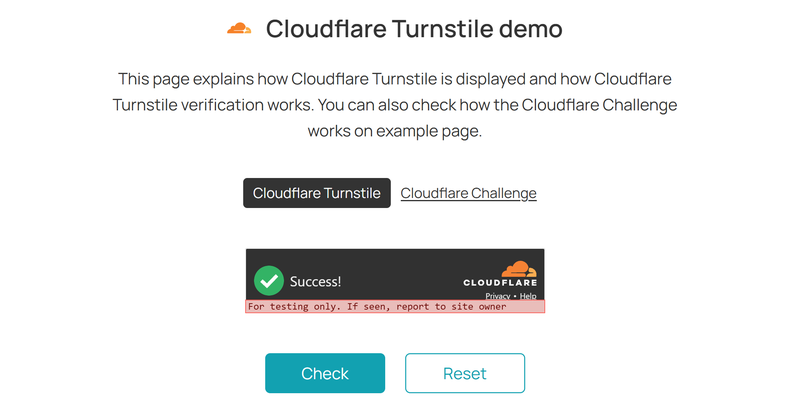
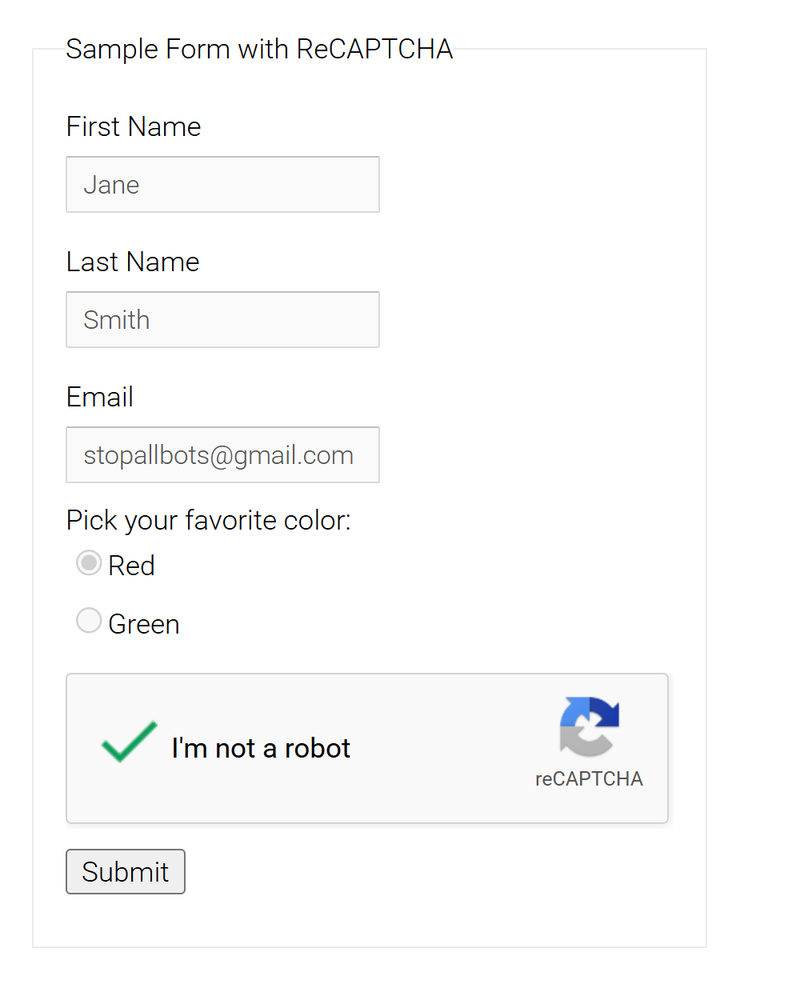
Call enable_captcha_auto_click(instance_id) once, and the server handles captcha checkboxes on every tab of that browser. It watches for Cloudflare Turnstile, Google reCAPTCHA v2 and hCaptcha widgets and clicks the checkbox itself, with a trusted mouse click. There is no extension and no solver service. get_captcha_status lists every click it made.
These three screenshots come from a live run through the MCP on 2.1.62, one click on each widget:
| Cloudflare Turnstile | Google reCAPTCHA v2 | hCaptcha |
|---|---|---|
 |
 |
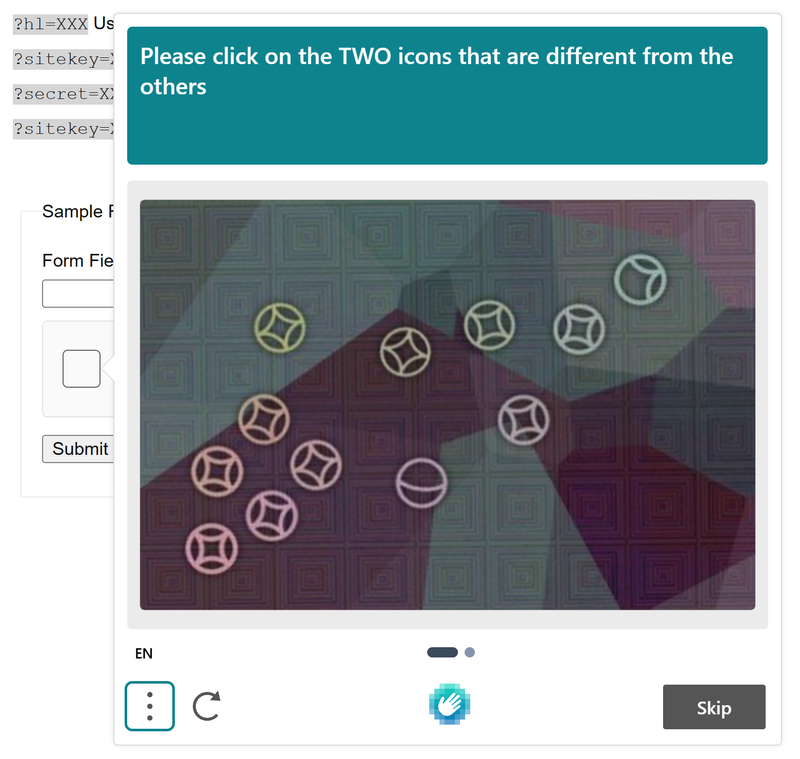 |
| Clicked, "Success!" | Clicked, ticked, token issued | Clicked; hCaptcha then asked for an image puzzle |
It clicks checkboxes only. It never solves image puzzles or sliders, and while a puzzle is showing it does not click. Whether a click passes is up to the captcha provider; hCaptcha, as above, often answers with a puzzle, which is left to you.
Speed is tested on every release, on Linux, Windows and macOS. The release is blocked if any of the three clicks comes more than 1 s after its checkbox is ready, or if a click the widget ignored is not tried again within 1.5 s.
persistent-sessions.mp4
- Undetectable by anti-bot systems — Cloudflare, DataDome, PerimeterX, etc.
- Captcha checkboxes clicked for you — Turnstile, reCAPTCHA v2 and hCaptcha checkboxes are clicked automatically once
enable_captcha_auto_clickis on; puzzles are never solved. See the screenshots - Named sessions — a session keeps its cookies and logins; new ones are seeded from
default - Stealth arg filtering — automatically strips 30+ detectable Chrome flags (Puppeteer/Playwright signatures, automation markers)
- Multi-instance support — spawn and manage multiple browsers simultaneously
- Built for fleets of Claude Code sessions — a session costs a thin stdio proxy (≈ 60 MB resident), not a browser: every session shares one backend per desktop, and a Chrome exists only where a session spawned one. Measured with 62 sessions attached at once; simultaneous cold start is scale-tested at 50 concurrent sessions, all usable in seconds against one backend — see Built for fleets
- A busy session re-attaches, and only then suffixes — spawning with a
sessiona live browser still holds joins THAT browser;github-sessionbecomesgithub-session-2only when the re-attach declines - Orphan recovery — safely cleans up leaked browser processes without killing live ones
- Session persistence — a new session carries the cookies, logins and Web Data of
default - Zero idle timeout — browsers stay alive until explicitly closed
- Full CDP access — DOM manipulation, network interception, JavaScript execution, screenshots
uv tool install stealth-chrome-devtools-mcp==2.1.68This installs a version-pinned executable at ~/.local/bin/stealth-chrome-devtools-mcp
(Windows: %USERPROFILE%\.local\bin\stealth-chrome-devtools-mcp.exe). Point your MCP
config (claude_desktop_config.json, ~/.claude.json, etc.) at it:
{
  "mcpServers": {
    "stealth-chrome-devtools-mcp": {
      "command": "C:\\Users\\<you>\\.local\\bin\\stealth-chrome-devtools-mcp.exe",
      "args": []
    }
  }
}
Claude Code one-liner (use the .exe path above on Windows):
claude mcp add --scope user stealth-chrome-devtools-mcp -- ~/.local/bin/stealth-chrome-devtools-mcpWhy not uvx in the config? It works, but uvx re-resolves the package on
every client session start. Each Claude Code session launches its own stdio
proxy, so a fleet of concurrent sessions (the shared backend is scale-tested at
50) turns startup into a package-resolution storm. A uv tool install gives
every proxy an instant, pinned executable — the shared backend, profile
handling, and per-session browser isolation behave identically.
To upgrade later: uv tool install stealth-chrome-devtools-mcp==<new-version>
(or uv tool upgrade stealth-chrome-devtools-mcp to track the latest release).
Zero-install trial (fine for a first look, not for fleets):
{
  "mcpServers": {
    "stealth-chrome-devtools-mcp": {
      "command": "uvx",
      "args": ["stealth-chrome-devtools-mcp==2.1.68"]
    }
  }
}
Or via pip (pip install stealth-chrome-devtools-mcp==2.1.68), then use the
stealth-chrome-devtools-mcp console script from that environment as the
command.
Crashes are reported to the maintainers by default, with your username and machine name scrubbed out. See Error Reporting for what a report contains and how to turn it off.
{
  "mcpServers": {
    "stealth-chrome-devtools-mcp": {
      "command": "uv",
      "args": [
        "--directory", "/path/to/stealth-chrome-devtools-mcp",
        "run", "stealth-chrome-devtools-mcp"
      ]
    }
  }
}The usual MCP browser server runs one server process and one Chrome per client session. That is fine for one session and ruinous for fifty: every session pays for a whole browser before it has done anything. This server is shaped differently. A Claude Code session runs only a thin stdio proxy. The browsers live in one shared backend per desktop, and a Chrome exists only where a session asked for one.
Measured on a Windows 11 workstation (2026-09-11) with 62 Claude Code sessions attached at once:
| Measured | |
|---|---|
| Claude Code sessions attached to the shared backends | 62 |
| Resident memory per session (its stdio proxy process tree) | ≈ 60 MB, ≈ 3.7 GB across all 62 |
| The same 62 sessions if each ran its own Chrome (≈ 750 MB per browser) | ≈ 46 GB |
| Backends on the machine | 3 — one per desktop context, plus headless |
| Live Chrome instances | 5 — only the ones sessions had spawned |
Cold start: 50 sessions at once, every one usable (initialize + tools/list) |
7.3 s (tests/test_startup_herd.py) |
| A 51st session joining the warm backend | 1.0 s |
What that buys a fleet:
- Memory scales with the browsers you use, not the sessions you open. An idle session holds a proxy, not a Chrome. Sixty sessions with five browsers between them pay for five browsers and sixty proxies, not sixty browsers.
- One cold start per backend. The first session boots the backend under a file lock; every other session converges on it and is usable in seconds. A session that arrives later joins in about a second.
- Nothing is left behind. Orphaned Chrome processes are reaped without killing live ones, and a spawn that fails after Chrome launched cleans up its own browser.
- Startup is not a package-resolution storm. With
uv tool installevery proxy is a pinned executable, so fifty sessions starting together do not re-resolve the package fifty times.
The per-session and per-browser figures above are the ones to plan capacity around. The backend's own footprint depends on what the sessions do with it (captured network bodies, stored element clones, live tabs), so it is not quoted as a constant.
A session is a named, persistent Chrome profile: spawn_browser(session="acme"),
or stealthy spawn --session acme. Ask for the same name again and you get the
same cookies and the same logins — and if a browser is still open on it, that
browser, not a new one.
default is the session you get when you name none. It is where a human
logs in, and every new session starts as a copy of it. session="default" opens
it explicitly. It is reserved: you cannot create a session of your own by that
name (nor by master or master-snapshot, which are the mechanism's own
directories).
seed_from / --from copies a NEW session from an existing one instead of
from default:
stealthy spawn --session work --headed          # log in by hand in this window
stealthy spawn --session work2 --from work      # a second session, already logged in
It applies only when the session is CREATED. Passing it for a session that already exists is an error that names where that session actually came from — never a silent no-op, and never a re-seed over a login you typed by hand.
The source may be open, as long as its browser is one this backend is
driving — which it is if you spawned it (the example above leaves the work
window up). Its cookies are then read out of the running browser and written
into the new session, and the spawn says so:
seeded     : seeded from work at 2026-09-21 14:02
cookies    : 14 handed over from the running source
That hand-off carries cookies and nothing else. Every kind — session,
persistent, HttpOnly, Secure, SameSite=None, Partitioned — and it
carries every site the source is logged into, not only the one you meant. It
does NOT carry localStorage, sessionStorage, IndexedDB, Cache Storage,
service workers or saved passwords, so a site that keeps its token in
localStorage will not be logged in; for those, close the source first so the
file copy can read them. If the hand-off fails the session is still created and
still works — the answer then says cookies : NOT carried (…).
A source open in a browser this backend does NOT drive — another backend's, or a Chrome you started yourself — is refused by name, because there is no connection of ours to ask it for its cookies and a file copy of a live profile carries none at all.
--from default — and an unset --from, which means the same thing — has
three outcomes, because default is the session you log in to by hand and its
window is usually still open:
the default window is |
what you get |
|---|---|
| open, and this backend is driving it | the seed is copied and the live jar is handed over — cookies : N handed over from the running source |
| open in a Chrome we do not drive | the seed is copied, and nothing is refused. The seed is only as fresh as the last time that window was closed, which the seeded line tells you (SEED CHANGED SINCE) |
| closed | the seed is copied, as it always was |
The seed is a separate, closed, copyable form of default (below) and it is
refreshed when that window closes. The one case that IS refused is a machine
where no seed exists yet and default is open: there is nothing safe to
copy, and copying the live directory would hand you a session missing exactly
the logins you wanted. Close the default window once — that writes the seed —
and it works from then on, open or not.
C:\stealth-mcp-browser-sessions\
  master/              # the `default` session — your logins, cookies, extensions
  master-snapshot/     # its seed: a safe copy, refreshed while `default` is closed
  sessions/            # your named sessions, and disposable copies
    acme/
    acme-2/            # auto-suffixed when a browser already holds `acme`
The directory names are historical and are what you will see in a path; the
words you type and the words the tool answers with are default and the seed.
- An unnamed spawn is always a disposable copy of the seed and never opens
default, whether or not anything has it open (F-966); onlysession="default"opens it - Before opening
defaultby name, the server refreshes its seed - When
defaultis busy, a copy is made from the seed with its live jar handed over - Copies carry all cookies, logins, and session data. On a brand-new install
there is no seed yet, so an unnamed spawn gets an empty copy and a
seed_warningthat says how to createdefault - A stale seed is auto-refreshed when auth files change
--from <session>copies a NEW session from that session instead
Whatever a session was copied from is recorded in it: stealthy profiles and a
spawn's own answer both print seeded from <name> at <when>, and flag
SEED CHANGED SINCE when the source has taken a login write since the copy was
made. A login done in one session still does not reach another on its own —
that is deliberate, and --from is how you ask.
Clones exclude regenerable Chrome caches, so each is a few MB rather than
multiple GB. Disposable auto-clones are deleted on close, and a storage cap
(STEALTH_MCP_CLONE_STORAGE_CAP_GB, default 10 GB) reclaims the oldest idle
clones if any ever leak — so sessions/ stays bounded. Cap eviction is
recoverable: an evicted clone is moved into sessions/.trash/ and only
purged after a retention window (STEALTH_MCP_CLONE_TRASH_RETENTION_HOURS,
default 24 h), so a mistaken eviction can be restored rather than lost.
Named profiles you create explicitly (e.g. github-session) persist and are
never deleted. But even a "persistent" profile is ~98% regenerable (caches plus
Chrome's multi-GB on-device AI model). So when sessions/ exceeds
STEALTH_MCP_BROWSER_SESSION_STORAGE_CAP_GB (default 20 GB), the largest idle named
profiles are trimmed of those regenerable dirs while every login is
preserved — Chrome rebuilds them on next launch. In-use profiles are never
touched.
Shared-machine note: the browser-session root defaults to
C:\stealth-mcp-browser-sessions(drive root), which holds your logged-in cookies and session data. On a single-user machine this is fine. On a shared multi-user Windows box, other local users may be able to read it — pointSTEALTH_MCP_BROWSER_SESSION_ROOTat a location inside your user profile (e.g.%LOCALAPPDATA%\stealth-mcp) so the OS user ACLs protect it.
One signed-in browser that several agents work from, and that outlives all of them.
spawn_browser(session="fleet")                 # first call creates it (a copy of the default seed)
spawn_browser(session="fleet", seed_from="upup-b9be57135713-84488-27")
                                               # or: make a browser that is ALREADY running the fleet
fleet is an ordinary named session, so everything named sessions promise holds:
close_instance keeps the profile, a backend restart re-attaches the browser under the
same instance_id (and restores fleet first), and nothing reaps it except
kill-orphans --force. A failed re-attach to fleet leaves its browser running and
recorded instead of reaping it, because the login in it cannot be re-created.
Asking for fleet while it is already open in this backend returns that instance with
already_running: true and the current session_lock; it is never walked to fleet-2
and never a copy. A spawn that names nothing is still never handed it. Closing it needs the
name too: close_instance(instance_id=..., session="fleet") (and session="default" for
default); without it the close is refused and the browser is left running, because other
chats work in it. If the running browser's
headless state differs from the headless you passed (the default False counts), the answer
adds headless_mismatch; a running browser cannot change it, so close it and spawn again. A
new session whose live cookie hand-off failed returns a top-level seed_warning (it is then
probably signed out), in addition to seeded_via: "copy" in spawn_diagnostics.
seed_from accepts any session name in the sessions directory, including the
<name>-<n> an agent's browser was walked to. If this backend drives the source, its live
cookie jar is carried over; if another process holds it, the request is refused by name.
Cookies only: no localStorage or IndexedDB from a running source (see spawn_browser).
Make it the default source for every new clone and new named session, instead of
master-snapshot: set STEALTH_MCP_SEED_SESSION=fleet. It is off by default. The
fleet session itself still bootstraps from the snapshot, and a misnamed value is refused
naming the setting. If the seed is held by a browser this backend does not drive, an
unnamed clone falls back to the snapshot with a seed_warning; an explicit seed_from or
a new named session is refused by name. Only the source rotates Google cookies (F-939);
clones, and a new named session seeded from a live browser, stay fenced.
The lock is advisory. Tool calls carry no caller identity, so a lock cannot stop another agent's calls; it is the shared answer to "is somebody using this?".
| Tool | Purpose |
|---|---|
acquire_session_lock(owner, session="fleet", lease_seconds=300, wait_seconds=0) |
Take or renew (same owner) the lease. Refused with the holder and expiry when held. lease_seconds 1-3600, wait_seconds 0-120; out-of-range is refused, not clamped. |
release_session_lock(owner, session="fleet") |
Holder only; anyone else, or a free session, is refused. |
get_session_lock_status(session="fleet") |
locked, holder, acquired_at, expires_at, expires_in_seconds. |
Leases expire on their own and are held in memory, so a backend restart clears them.
The server automatically strips Chrome flags that would compromise stealth:
| Category | Examples | Why Stripped |
|---|---|---|
| Automation signals | --enable-automation, --test-type |
Sets navigator.webdriver=true |
| Fingerprint leaks | --disable-gpu, --disable-webgl |
Detectable via WebGL/canvas probes |
| Puppeteer defaults | --disable-backgrounding-occluded-windows |
Bot signature fingerprint |
| Playwright defaults | --password-store=basic, --use-mock-keychain |
Bot signature fingerprint |
Stripped args are reported in spawn_diagnostics.stealth_args_stripped.
On Windows a spawn also launches with --disable-features=CalculateNativeWinOcclusion, so a headed window that other windows cover keeps visibilityState visible at Normal priority instead of being backgrounded (F-1010); the Puppeteer backgrounding switches above stay stripped.
The shared backend listens on 127.0.0.1 and refuses what a web page could send it: a request whose Host is not a loopback name
(a DNS-rebound domain, 421) or whose Origin is a foreign web origin (403). It also demands a per-user bearer token on every
request: the backend keeps one in ~/.stealth-mcp/backend.token (readable by your OS user only; mode 0600, or a single-user ACL on
Windows) and answers 401 without Authorization: Bearer <token>. The stdio proxy, stealthy, doctor and status read the file and
send it, so nothing changes for them. A raw curl or a uvx url-transport client must send the header itself. After upgrading, restart
Claude Code sessions that were open on an older release if they cannot reconnect. If you bind another address on purpose
(--host backend.lan), that name is allowed too; --allowed-host NAME (repeatable) adds a name such as a reverse proxy's.
The DevTools port of each browser it launches is a different matter: it listens on loopback (Chrome's default; the stealth filter strips --remote-debugging-address from browser_args) without a token and Chrome runs with
--remote-allow-origins=*, so any local process can drive a browser this tool started. That is by design for a single-user machine,
and the tool is not meant for multi-user hosts (RUNBOOK, "Local trust boundary").
A person stores logins once; an agent asks the backend to sign one in by label. No password, passphrase, key or decrypted vault content reaches a model: not in a tool argument or result, a log line, an error report, a network record or any CLI output, and there is no "show password" operation.
stealthy login init                                   # new passphrase, typed twice
stealthy login add work --site example.com --login-url https://accounts.example.com/signin --user me@example.com
stealthy login unlock --for 8h                        # puts the key in the backend's memory
Then an agent calls list_logins() (labels, sites, whether one is frozen; a username only if you passed --show-username) and login(instance_id, label), which answers logged_in, already_logged_in, needs_totp, needs_user, rejected or use_provider. The sign-in happens in a tab the backend opens for itself: while it runs, every tool call naming that tab is refused, execute_cdp_command and switch_tab are refused for the whole browser, hooks and network capture never arm it, and the tab is closed afterwards. The session is saved in the profile, so reload your own tab.
- Where it is kept.
~/.stealth-mcp/vault.json, scrypt + AES-256-GCM, labels and sites encrypted too. The key is derived on your machine from a passphrase typed at a terminal (unlockandinitrefuse a pipe or a script) and exists only in the backend's memory untillock, the--forperiod or the backend exits. Passwords are only ever a hidden prompt or--password-stdin, never an argument or an environment variable. - Where it types. Only on
httpsand a host exactly in the entry'shosts(default: the login URL's host), checked from the browser's own frame tree before every field. A browser started with a proxy or a host-resolver, certificate, same-origin or extension switch (in any spelling Chrome accepts), or whose environment, profile flags or machine policy do the same, is refused. No page the agent can use reaches Chrome's DevTools endpoint. - After a refusal. One
rejectedfreezes that entry untilstealthy login editclears it, so an agent cannot retry a wrong password into an account lockout.stealthy login auditlists every attempt (no secret, no username). - Defence in depth. Registered passwords, plain and URL-encoded, are also masked in Sentry events, log lines (tracebacks too) and the debug view and export, and a release-gate test searches all of them after a real login.
- DevTools. A page cannot reach Chrome's debug port, and no tool can load a DevTools window or
chrome://inspect(navigateandnew_tabrefuse them, whatever the spelling: percent-encoded, upper-case, with a port or userinfo, behindabout:orview-source:, with a soft hyphen or an ideographic full stop in the host); one that appears anyway (a headed person's F12,execute_cdp_command) is hidden from every tool, and the login closes it, or refuses to type if it cannot, before it types a field. A login therefore closes every DevTools window open in that browser; the result says how many (closed_devtools_windows, counted for that browser only; a login never closes a window in another browser). If the guard's connection to the browser drops, the windows it knew stay barred and a login in flight stops, clearing what it typed. Marks onchrome://andfile:pages also stay while the browser is alive, and nothing updates them after the guard ends, so a page that later navigates to one of those is not barred by the guard (the URL tools still refuse to load them); the marks of a browser that is gone are dropped, and the bars on DevTools windows of a dead browser are not. - While a login runs. Every browser-internal page (
chrome://,chrome-extension://,chrome-untrusted://,devtools://and the like) is hidden fromlist_tabs, refused by every tool and cannot be loaded bynavigateornew_tab;about:blankand the new-tab page still work, and outside a loginchrome://pages are ordinary.go_backandgo_forwardare refused for the duration too. - Vault mode. The agent's tools are an unusually large surface: some run code, some write files where code loads, some read any file. So while a vault file exists (locked or unlocked) every raw or unbounded capability is refused in every backend, from one list (
embedded/vault_mode.py), with a message that names the vault andstealthy login destroy; with no vault each of them behaves exactly as before. Refused: (1)create_python_bindingandcreate_dynamic_hook, which run the caller's Python inside the backend with its authority; (2)execute_cdp_command(raw CDP can point Chrome's downloads at any folder, read a local file into a page or load code, and no list of methods is safe;list_cdp_commandsstill works); (3)spawn_browser(browser_args=...)switches other than--window-size,--window-position,--start-maximized,--lang,--accept-lang,--user-agentand the one value--disable-blink-features=AutomationControlled(and http(s) start pages; the other feature-list switches--disable-features,--enable-featuresand--enable-blink-features, and any other value of--disable-blink-features, are refused, because the feature names are an open list that includes site isolation and private-network protections), because Chrome has switches that write a file you name (--log-file) or start a program (--renderer-cmd-prefix,--gpu-launcher), anduser_data_diras a path (a session NAME still works); (4)file:URLs innavigate,new_tabandcreate_simple_dynamic_hook, and any tab that reaches one, which is hidden and blanked like an inspector (a page there could readvault.json); (5) a pickle export (export_debug_logswrites JSON in the mode); (6) a download folder of the page's choosing: every browser a backend drives is pinned to~/Downloads/stealth-mcp-downloadsunder generated names, re-asserted every five seconds (the same pass hides achrome://page that was already open when the vault appeared; until the pass reaches that page, a tool called with notab_idcan still act on it, and a pass takes more than its five seconds' interval to arrive when the machine is slow: seconds on a cold one, 11 s measured for a first pass), so a page cannot saveevil.pthanywhere. Two limits, stated plainly: a browser that was already running when the vault appeared can still hold its old download folder for up to five seconds (no tool can change it in that window; page script could still start a download), and it keeps whatever launch switches it was started with (a proxy,--remote-allow-origins=*, an old--user-data-dirpath): the mode pins its downloads and barsfile:pages, it does not rewrite the browser; (7)chrome://,chrome-untrusted://anddevtools://pages: hidden from the tools and refused by every URL tool, always, and a call that names notab_idis refused when the tab it would act on is one a person left current (callnew_tab, or pass thetab_idof a tab you opened); the new-tab page andabout:blankwork. A tab the backend cannot identify is refused the same way, so in vault mode a call with notab_idcan fail until you callnew_tab. Such a page can send commands to the browser itself. JavaScript-only tools (execute_script,inject_and_execute_script,create_persistent_function,execute_python_in_browser, which compiles to JavaScript) andcreate_simple_dynamic_hookstay available.stealthy login initlists all seven before it asks for a passphrase and refuses while any backend this machine knows has already run caller Python, or cannot say (an older release, a process that does not answer, an unreadableserver.json: restart it, then runinitagain);unlockandstatusrun the same check,statusprintsvault mode: ONand each restriction, andstealthy login destroylocks every backend and deletes the vault, which turns the mode off. Older releases: a backend of a release before vault mode has no gate at all, so restart every backend on this release before you create a vault and after you upgrade with one; until then that backend still has the Python tools. What this does not cover: The guarantee is against an agent that has only this MCP's tools. If caller Python ever ran on this machine before the vault was created, or the agent has any other way to run code as the same OS user (a shell tool, for example), nothing here can protect the vault from what that code left behind. - A site that shows its form again. A site that keeps showing its login form after a sign-in that worked reads
needs_user; only a form that comes back in a new page, or a new error message, counts as a refused password (and freezes the login). - Files the tools read and write.
export_debug_logs,export_network_dataandtake_screenshotnever write a file the machine would run: not into any Pythonsys.pathor site directory (the working directory excepted), the Python and virtual-environment trees, this package, OS startup folders or shell and PowerShell profiles, and never a file named like code (.pth .py .pyc .pyd .so .cmd .bat .ps1 .sh .lnk .exe .dll .vbs .js .desktop .plistand the like, in any case, with Windows' trailing dots and stream names folded);upload_fileandimport_network_dataread nothing in a credential store, a browser profile or this server's state. These rules apply with or without a vault. The check resolves dozens of paths, so it runs on a worker thread and never stalls the backend. - Not covered. The signed-in session itself (an agent in a logged-in browser can act as you); any process running as your OS user, which can read the backend's memory or open Chrome's debugging port directly on the loopback interface (the guard keeps agent tabs out of it, not local processes); extensions installed in the profile and the operating system's own proxy and certificate store; your username, which Chrome's autofill may keep in the profile's
Web Data(the password is never written to the profile); login flows that are not username-then-password (they returnneeds_user); two-factor completion and the "sign in with Google" account chooser (a later phase:use_provideronly makes sure the provider account is signed in).--disable-loginsremoves the two tools.
On server restart, the process cleanup system:
- Reaps only browsers whose owner backend is dead — every tracked browser records which backend started it, so two backends running side by side never reap each other's browsers
- Keeps
create_timetracking as a second net: never kills a process that started after the current server session began - Safely handles
psutil.AccessDeniedon Windows elevated processes
A headed browser appears on the desktop of whichever process launched it, not of whichever session asked. Because sessions share a backend, a backend that was first started from an SSH login or a Windows service session cannot show a window to anyone — including the sessions running on the physical desktop.
So the backend is keyed by display context: one per desktop, plus one for a
headless context. Discovery prefers a backend that can show a window, which means
an SSH-driven spawn_browser(headless=False) automatically uses the desktop
backend and its window opens on the real screen. Where no such backend exists, the
spawn raises instead of handing back an invisible browser; run
stealth-chrome-devtools doctor to see which contexts have a backend. Headless
spawns work from anywhere.
# A disposable copy of the shared default session (what you get when you name none)
spawn_browser()

# A named session, with login persistence
spawn_browser(session="github-session")

# Same name while a browser still holds it → re-attached to THAT browser
spawn_browser(session="github-session")

# Headless with stealth (bad args auto-stripped)
spawn_browser(headless=True, browser_args=["--enable-automation"])
# → stealth_args_stripped: ["--enable-automation stripped: sets navigator.webdriver=true"]| Tool | Description |
|---|---|
spawn_browser |
Launch a new stealth browser instance |
navigate |
Navigate to a URL |
take_screenshot |
Capture page screenshot |
execute_script |
Run JavaScript in page context |
query_elements |
Find DOM elements by CSS selector |
click_element |
Click on an element |
type_text |
Type text into an input |
get_page_content |
Get page HTML content |
list_instances |
List all active browser instances |
close_instance |
Close a specific browser |
list_network_requests |
View intercepted network traffic |
get_cookies / set_cookie |
Manage browser cookies |
enable_captcha_auto_click / disable_captcha_auto_click |
Click Turnstile, reCAPTCHA v2 and hCaptcha checkboxes automatically |
get_captcha_status |
Whether the auto-clicker is on, and every click it made |
102 tools across 14 sections — the count is derived from the live tool registry, never hand-maintained. See the full navigation map →.
That is what the server serves, which is not the same as what the release
gate proves. At the release SHA in the evidence ledger, 3 of those 102 are
release-qualified: asserted end-to-end over the real stdio transport a client
actually speaks. The rest are driven against real Chrome by the E2E suite but
through an in-process seam, so they are served-unqualified at the wire — tested,
not proved there. RELEASE_CONTRACT.md lists the state of
each tool and is the only source for those numbers.
# Unit tests only (no Chrome needed)
uv run pytest -m "not integration"

# All tests (needs Chrome installed)
uv run pytest

# Verbose with short tracebacks
uv run pytest -v --tb=short
If your checkout path contains spaces or an
&,uv run pytestfails withFailed to canonicalize script path— use the venv Python directly:.venv\Scripts\python.exe -m pytest -m "not integration". See CONTRIBUTING.md for the full test/gate workflow.
A comprehensive suite covers stealth arg filtering, profile resolution, orphan recovery, storage-cap sweeps, the ops CLI, and full browser integration.
All optional. Defaults work for normal use. Set them in your shell, or in
~/.stealth-mcp/.env — every key is documented in .env.example.
A .env in your project directory is deliberately ignored. The backend is a
shared process launched with whatever folder your MCP client had open, so
reading the project's .env meant reading someone else's application config —
which crashed the server outright on an ordinary DATABASE_URL and silently
adopted that app's PORT, DEBUG, and SENTRY_DSN as the server's own.
| Variable | Default | Purpose |
|---|---|---|
STEALTH_MCP_BROWSER_SESSION_ROOT |
C:\stealth-mcp-browser-sessions (Win) / ~/.stealth-mcp-browser-sessions (Unix) |
Base folder for profiles |
BROWSER_MASTER_USER_DATA_DIR |
<root>/master |
the default session's directory (name is historical) |
BROWSER_MASTER_SNAPSHOT_DIR |
<root>/master-snapshot |
its seed: what a new session is copied from |
BROWSER_PROFILE_CLONE_ROOT |
<root>/sessions |
Folder for profile copies |
STEALTH_MCP_CLONE_STORAGE_CAP_GB |
10 |
Cap on total auto-clone storage; oldest idle clones are reclaimed when exceeded (0 = disable). Named profiles and in-use clones are never touched. |
STEALTH_MCP_BROWSER_SESSION_STORAGE_CAP_GB |
20 |
Cap on total sessions/ storage; when exceeded, the largest idle named profiles are trimmed of regenerable cache/model dirs — logins kept (0 = disable). (Renamed from STEALTH_MCP_SESSION_STORAGE_CAP_GB; update your config — the old name is no longer read.) |
STEALTH_MCP_CLONE_TRASH_RETENTION_HOURS |
24 |
How long a cap-evicted clone stays recoverable in sessions/.trash/ before purge (0 = purge on next sweep). |
STEALTH_MCP_CLONE_OUTPUT_DIR |
~/.stealth-mcp/element_clones |
Where screenshots, large-response spills, and element-clone files are written. Kept in a per-user dir (never inside the installed package) so a read-only site-packages can't break captures. |
BROWSER_IDLE_TIMEOUT |
0 |
Idle cleanup timeout (0 = disabled) |
STEALTH_CHROME_PROFILE_KEY |
unset | Force a stable clone key |
STEALTH_MCP_CLIENT_ROOTS_TIMEOUT_SECONDS |
5 |
Deadline for the roots/list request the auto-clone path sends to the MCP client to name a clone. MCP roots is optional, so a client may never answer; on expiry the clone name falls back to CODEX_WORKSPACE/CLAUDE_PROJECT_DIR/PWD/cwd (0 = never ask). |
STEALTH_BROWSER_DEBUG |
false |
Enable debug logging |
STEALTH_MCP_NO_ERROR_REPORTING |
false |
Set to true to disable error reporting |
STEALTH_MCP_NO_PERSIST_SESSION_COOKIES |
false |
Logins are kept by default (F-937). Persistent profiles (the default session and named sessions) get the Chrome pref session.restore_on_startup=1 set through chrome://settings (once per profile, in the background after the spawn has returned; a profile that already has it is not touched), which is the only thing that makes Chrome write session cookies (Apple ID, Xero, Walmart Seller, ...) to disk at close; the saved tabs it would then restore are deleted before each launch and never copied into a clone or seed, so a spawn still opens on one about:blank. Set to true to not set the pref; a profile that already has it still gets its saved tabs removed before each launch (otherwise the next launch would reopen them). |
STEALTH_MCP_NO_DISABLE_DBSC |
false |
Google stays signed in by default (F-937): Chrome launches with Device Bound Session Credentials disabled (--disable-features= EnableBoundSessionCredentials, DeviceBoundSessions, DeviceBoundSessionsFederatedRegistration, DeviceBoundSessionsForRestrictedSites, EnableBoundSessionCredentialsContinuity, EnableChromeRefreshTokenBinding, EnableChromeRefreshTokenBindingUpgrade, EnableCookieBindingCookieUpgrade, merged into the one --disable-features switch Chrome honors, next to nodriver's own). Their TPM-bound __Secure-1PSIDTS / __Secure-3PSIDTS cookies do not survive a relaunch, which signed the account out. Set to true to launch without the switch. |
STEALTH_MCP_ALLOW_BROWSER_SIGNIN |
false |
Chrome's own sign-in is off by default (F-938): every spawn (master, named session, auto-clone, delegated desktop launch) passes --allow-browser-signin=false, so Account Consistency is None and the account reconcilor Inactive. With it on (stock DICE), a clone or seed carries Google cookies but no token in the token service, and the reconcilor logs those cookies out server-side, which signs the master out too. Web sign-in to Google still works. A caller's own --allow-browser-signin=... in browser_args wins. Set to true to launch without the switch. |
STEALTH_MCP_ALLOW_CLONE_GOOGLE_ROTATION |
false |
Clones never rotate Google session cookies (F-939): on every target of an auto-clone, requests made from tabs, popups, iframes and workers to accounts.google.com / accounts.youtube.com /RotateCookies* and /RotateBoundCookies* are failed (the requests a page makes, redirect hops and workers included; a document load of one is NOT failed, whether an iframe's, a popup's, a new tab's, a top-level navigation or a form-POST navigation, and the POST the RotateCookiesPage script makes is what is blocked. Not established: whether a document load of RotateCookiesPage rotates the pair by itself.), so only the master rotates. Many clones rotating one copied session fork its __Secure-*PSIDTS chain and Google revokes the session everywhere. true lets clones rotate. |
STEALTH_MCP_NO_LIVE_MASTER_SEED |
false |
A clone spawned while the shared (master) session is open in a browser this backend does not drive gets the master's LIVE cookies over its loopback debug port (F-939), not the stale master-snapshot. true restores the refusal. |
STEALTH_MCP_SEED_SESSION |
(empty) | Copy every NEW clone and NEW named session from this session (e.g. fleet) instead of master-snapshot (F-952). Its live cookies are handed over when this backend drives it. Empty keeps the snapshot. A name that does not exist is refused naming this setting. |
STEALTH_MCP_LOG_LEVEL |
INFO |
Minimum level the file logger records (DEBUG, INFO, WARNING, ...). An unrecognized value falls back to INFO instead of failing startup. |
STEALTH_MCP_LOG_DIR |
~/.stealth-mcp/logs |
Where the file logs and freeze dumps are written (RUNBOOK). |
STEALTH_MCP_NO_AUTO_RECOVERY |
false |
Internal. Skips the startup orphan-browser recovery and signal-handler install, in-process only: the stealthy CLI's read-only commands set it themselves so running them never reaps a live backend's browsers, and it also applies to serve and --standalone. A backend spawned for the proxy ignores it (it is removed from the child's environment). You should not need to set it. |
STEALTH_MCP_NETWORK_CAPTURE_BODIES |
false |
Capture response bodies for get_response_content (metadata is always captured). Off by default; bounded by the two byte caps below. |
STEALTH_MCP_NETWORK_BODY_MAX_BYTES |
5242880 (5 MiB) |
Per-body cap when body capture is on, in bytes; a larger body is not stored (0 = unbounded). |
STEALTH_MCP_NETWORK_BODY_STORE_MAX_BYTES |
134217728 (128 MiB) |
Total response-body store cap, in bytes; once exceeded the oldest bodies are evicted (0 = unbounded). |
STEALTH_MCP_NETWORK_REQUEST_MAX_COUNT |
10000 |
Retained network requests per backend; the oldest are evicted first (0 = unbounded). |
STEALTH_MCP_NETWORK_POST_DATA_MAX_BYTES |
5242880 (5 MiB) |
Per-request post_data cap, in bytes (0 = unbounded). |
STEALTH_MCP_NETWORK_CAPTURE_INTERNAL_URLS |
false |
Also capture Chrome's own non-web traffic (new-tab page, extensions, devtools, error pages), excluded by default because it drowns real page requests. set_network_capture_filters(capture_internal_urls=True) does the same for one instance. |
CLOSE_KILL_TIMEOUT |
5 |
Time budget in seconds for close_instance's blocking Chrome kill; if it runs over, the kill continues in the background and process cleanup reaps any orphan (must be > 0). |
BROWSER_IDLE_REAPER_INTERVAL |
60 |
Seconds between idle-browser sweeps (>= 1); only matters when BROWSER_IDLE_TIMEOUT is non-zero. |
BROWSER_ORPHAN_PROFILE_MAX_AGE |
21600 (6 h) |
Seconds a stale nodriver temp profile (uc_* in the system temp dir) must be untouched before startup recovery removes it; 0 disables the sweep. |
BROWSER_PROFILE_KEY |
unset | Fallback for STEALTH_CHROME_PROFILE_KEY: a stable clone key (the latter wins when both are set). |
CDP_OPERATION_TIMEOUT_SECONDS |
30 |
Seconds a single CDP operation may take before it is abandoned. Must be greater than 0. |
EXECUTE_SCRIPT_TIMEOUT_SECONDS |
10 |
Seconds execute_script lets user JavaScript run, so a blocking script fails fast. Must be greater than 0. |
MAX_USER_SCRIPT_BYTES |
100000 |
Largest script execute_script accepts, in bytes; use upload_file for big payloads. |
BROWSER_STATE_TIMEOUT_SECONDS |
10 |
Time budget, in seconds, for get_instance_state's page-storage reads. Must be greater than 0. |
XPOOL_SAFE_MODE |
false |
Same as the backend's --xpool-safe: disables the cdp-functions section (tools that trigger Runtime.enable). |
PORT |
8000 |
Default of the backend's --port (HTTP transport). Read only from the shell or ~/.stealth-mcp/.env, never a project .env. |
DEBUG |
false |
Same as STEALTH_BROWSER_DEBUG and --debug: debug logging to stderr. Read only from the shell or ~/.stealth-mcp/.env, never a project .env. |
Installs a stealthy command. It both operates the backend and drives its
tools, so a shell can do anything an AI client can. (stealth-chrome-devtools is
the same command under its older name — one CLI, two names, not two tools.)
Every one of these talks to the backend your shell would be served by — the
same one status reports — and starts one if none is running (--no-start makes
that an error instead: a live backend is always used as-is, whatever build it is,
but starting one can evict a wedged backend of another build). Output is a
table on a terminal and JSON in a pipe:
stealthy ls                                          # browser instances
stealthy spawn --session seller-central --headed     # recover a stranded login
stealthy spawn --session staging --from seller-central  # a new session, already logged in
stealthy spawn --headed                              # a disposable copy of `default`
stealthy spawn --headless --url https://example.com  # no window; navigate once it is up
stealthy nav e364 https://example.com --wait load    # ids resolve by prefix
stealthy call get_cookies --arg instance_id=e364c31b --arg domain=example.com
stealthy tools --section browser-management
stealthy spawn takes --headed (show a window) or --headless (no window) -- mutually exclusive -- and --url to navigate after spawning.
The server entry point (stealth-chrome-devtools-mcp) also accepts --standalone (run the stdio server in this process instead of bridging to the shared backend), --singleton-port PORT (the backend port to find or start; defaults to the standard backend port, and tests pass a free one to get a private backend) and --exit-if-unadopted (internal; HTTP only; the backend exits if no client reaches it within five minutes and it hosts no browser -- passed by the cold start that spawns a backend for a proxy, never by an operator running serve).
call reaches any tool the backend serves — there is no per-tool mirror
here, so a newly added tool is callable the day it ships. --arg key=value
values are JSON when they parse (headless=false, viewport_width=1200,
browser_args=["--x"]) and plain strings when they do not; --json '<object>'
passes the whole arguments object at once.
spawn --session <name> is the stranded-login recovery: if a browser is
already holding that session it is re-attached to over CDP — same window, same
open page — and the answer says REATTACHED. See RUNBOOK, Recover a stranded
login. A session is a NAME; to open a directory by PATH use
stealthy call spawn_browser --arg user_data_dir=<path>. A spawn with no
--session is a disposable copy of default, never default itself. Either way the
answer prints the profile_selection the backend actually made — role and
directory — so you can see what you got rather than infer it.
Every failure there is becomes one of these, and errors are one line on stderr — a script never gets a raw traceback paired with Python's own exit 1:
| Code | Means |
|---|---|
0 |
it worked |
1 |
the tool answered and said no — the round trip succeeded |
2 |
usage: a bad flag, a bad --arg, an ambiguous id, no verb at all (argparse's own code, so its refusals and ours are indistinguishable to a script) |
3 |
no backend: nothing running and --no-start, or the transport failed, so nothing on the backend ever saw the request |
70 |
a bug in the CLI itself (EX_SOFTWARE) — never 1, which would blame the tool |
130 |
Ctrl-C |
141 |
the reader went away: 128 + SIGPIPE, so stealthy ls | head -1 under set -o pipefail looks exactly like ls | head -1. No message — your head did what you asked |
--traceback adds the full stack after that one line; it never replaces it
and never changes the code.
These four only read and preview — they change nothing, and the test suite runs them on every commit, so they are known to work:
stealthy status
stealthy profiles
stealthy cleanup
stealthy cleanup --browser-session-cap-gb 12
status reports whether the backend is up plus the browser-session root and both
caps; profiles lists profiles with size / role / in-use; cleanup previews the
reclaimable disk (dry run), and --browser-session-cap-gb previews it at a
tighter cap.
These are not auto-executed — --apply deletes, serve does not return, and
doctor needs Chrome installed:
stealthy cleanup --apply               # actually reclaim
stealthy doctor                        # check Chrome / environment
stealthy serve --http --port 19222     # start the server
cleanup deletes idle auto-clones over the clone cap and trims idle named
profiles down to their session state — logins kept — over the browser-session cap. It
is a dry run unless you pass --apply, never touches in-use profiles, and
uses the same selectors as the automatic sweep, so the preview matches --apply.
- Start the MCP server
- Call
spawn_browser(session="default")— or, from a shell,stealthy spawn --session default --headed - Sign in to your accounts in the browser that opens
- Close it with its session name —
close_instance(instance_id=..., session="default"), orstealthy close <instance> --session default— which also refreshes the seed every other session is copied from
A spawn with no session never reaches default (F-966): it is always a
disposable copy of its seed, whether or not default is open, so closing your
own browser cannot close the shared one. close_instance refuses the default
and fleet browsers unless it is given that session's name. The
profile_selection in the answer (profile_role + the directory) says which you
got — default, or clone.
- Python 3.11+
- Chrome, Chromium, or Microsoft Edge
- uv (recommended) or pip
- A desktop session for headed browsing (headless works from SSH, CI, and services)
Crashes and errors are reported to Sentry by default, so that a failure you hit is a failure we can see and fix. There is nothing to install and nothing to configure: the SDK ships with the package and the destination is built in.
What a report contains. The exception type and message, the stack trace, the package version, whether the package is an editable (development) install, and the platform. Three things are kept out of it:
- your machine name (Sentry's
server_name) is dropped entirely; - your username is removed from every path, so a stack frame reads
C:\Users\~\...,/home/~/...or/Users/~/...instead of your home directory; - local variables are not captured at all. The Sentry SDK sends them by
default; we turn that off, because a local in this tool can hold a proxy
password, an
AuthorizationorCookieheader, or a script you asked it to run — secrets that no path rule could rescue.
That is universal — it runs on every install, ours included, and there is no way to opt back into sending those fields. What it deliberately leaves alone is the part that makes a report useful: the error type, the module path after the home segment, the source line that failed, and the release it came from.
An error message still quotes whatever the failing call was working with — a URL you navigated to, a file you asked for. If that is not a trade you want to make, turn reporting off.
To turn it off, set one variable in your shell or in ~/.stealth-mcp/.env:
STEALTH_MCP_NO_ERROR_REPORTING=trueEarlier releases read SENTRY_DSN from the environment. They no longer do —
that variable belongs to your application, and a shared backend launched from
your project folder was picking it up. See
Environment Variables for why this tool ignores your
project's .env entirely.
git clone https://github.com/DevinoSolutions/stealth-chrome-devtools-mcp
cd stealth-chrome-devtools-mcp
uv sync --extra dev --extra test   # install linters + test deps
npm install                        # arm husky pre-commit/pre-push hooks
The six quality gates run automatically on every commit: ruff format, ruff check, ty check, vulture, suppression-owner check, file-budget check. Unit tests run on pre-push.
- CLAUDE.md — conventions + glossary; the navigation map of the source tree is NAVMAP.md
- DESIGN.md — architecture invariants and the why behind them
- RUNBOOK.md — operating the backend: verbs, logs, recovery, MCP smoke path
- CONTRIBUTING.md — clone → install → test, the quality gate, conventions
See LICENSE.
Built by Devino Solutions